
GlowUp Girlie questions, answered
In short
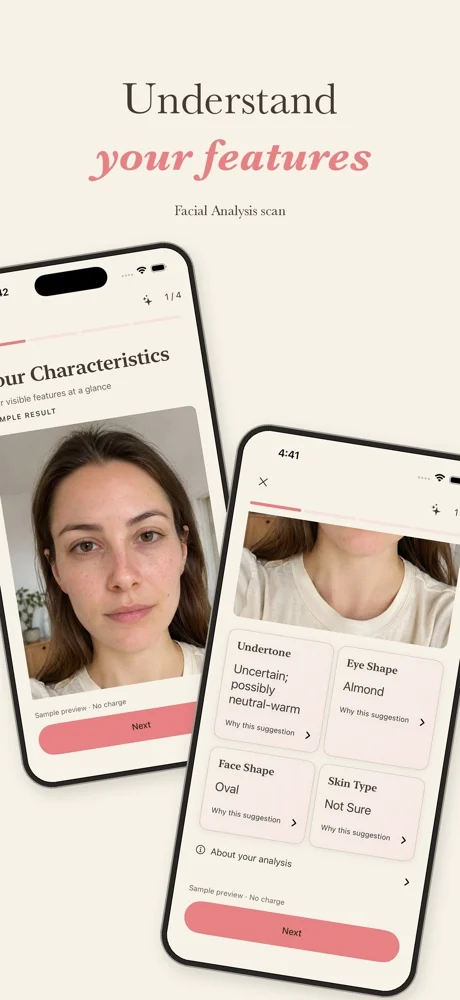
GlowUp Girlie ("Color Analysis: GlowUp Girlie" on the App Store) is an iPhone app for ages 13+, coming soon. It has three separate scans (Color Analysis, Facial Analysis and the Glow Up Guide) and a scan assistant. Personalized results need a weekly plan ($6.99, $9.99 or $12.99 a week in the US, no free trial) or a one-time referral reward scan, and they're saved to reopen. It never rates faces, diagnoses skin or promises results.
Key takeaways
- Each analysis is a separate scan, and failed scans don't use your allowance.
- Color results are indicative: good daylight matters, and in-person draping can go further.
- The free tools on this site need no photo and no account, and run in your browser.
On this page5 sections
Scans and results
Does one selfie give me all three results?
No. Color Analysis, Facial Analysis and the Glow Up Guide are separate scans, and each uses one successful scan from your allowance. Your results are saved, so you can reopen them without scanning again. See how it works.
Is the AI makeup preview what I'll really look like?
No, and the app labels it that way. The Glow Up Guide preview is an AI-generated illustration of a makeup style: a still image, not a live filter, and not a promise of a real-life result. The numbered steps are the part to follow.
What can I ask the scan assistant?
Questions about a completed scan, its makeup steps, or outfit colors you describe in words, like a navy dress. Each completed scan comes with 10 answers. More on the scan assistant page.
Accuracy
How accurate is color analysis from a selfie?
It's a strong starting point when the photo is good, and less reliable when it isn't. That's why the app calls its season indicative, for example "possibly Soft Autumn". Cameras adjust color to the light around you, so warm lamps, shade, screens, filters and makeup can all shift your result. Take the selfie facing a window in daylight, with no filter and a bare or nearly bare face. If you land between two seasons, compare both palettes against your face in daylight. In-person draping with a trained analyst can go further than any photo. More on this on the color analysis feature page.
How accurate is the face shape result?
Face shape depends on how your forehead, cheekbones and jaw compare in width, how long your face is, and your jawline. Many faces mix two shapes. Keep your chin level and your hair off your face for the clearest read. You can double-check with a tape measure using the free face shape finder.
Are the free quizzes on this site as good as the app?
They are different. The quizzes ask you questions or use measurements you take yourself, so they give a strong starting point. The app's scans work from your photo instead. Both are honest about what they can and can't tell you. Try the color season quiz or the eye shape quiz.
Skin tones and features
Does GlowUp Girlie work for deep skin?
Yes. Every season includes deep, medium and fair skin, because a season describes the whole picture of skin, hair and eyes. GlowUp Girlie never suggests lightening your skin.
I have hooded eyes, monolids or a round face. Is that a problem?
Not at all. No face shape or eye shape is a problem. Each one has makeup techniques that suit it, and Facial Analysis suggests steps for yours. Read the face shapes and eye shapes guides to see how.
Will GlowUp Girlie tell me to get surgery or fillers?
Never. GlowUp Girlie never suggests surgery, fillers, thread lifts, mewing, "bone smashing" or any procedure, and never gives diet or weight advice. Makeup and color can do a lot, and that's where we stay.
Is GlowUp Girlie medical or skin advice?
No. GlowUp Girlie is about color and makeup. It doesn't diagnose skin: you choose your own skin type. For acne, rashes, hair loss or a spot that changes, see a dermatologist or doctor.
Phones and photos
Which phones will it work on?
GlowUp Girlie is an iPhone app. Other devices haven't been announced.
Do I need to upload a photo to use this website?
No. Every tool on this site works without a photo. You answer questions or take a few measurements in a mirror, and it all runs in your browser. Read our privacy page for how the website handles data.
Where should I start?
Take the color season quiz: about 3 minutes, no photo. If you'd like a quicker first step, the undertone test takes about 2. How it works shows the full flow and pricing in the app.
Questions people ask
What is GlowUp Girlie?
GlowUp Girlie is a selfie-based beauty app for iPhone. It suggests colors and practical makeup steps for your features, with an illustrative AI makeup preview. Its three scans are Color Analysis (season, undertone, palette to try), Facial Analysis (face and eye characteristics with makeup steps) and the Glow Up Guide (steps for a look you choose, with a labelled AI preview).
How much does GlowUp Girlie cost?
Personalized results need a weekly subscription: in the US, $6.99 a week for 1 successful scan, $9.99 for 2 or $12.99 for 4. Plans renew automatically, there's no free trial, and you can cancel any time in your iPhone's Settings. The App Store shows your local price. Failed scans don't count, and saved results reopen free.
How does the referral reward work?
When three eligible new devices complete onboarding with your invite, you earn one free successful scan. It's once per person, and the people who join don't have to buy anything.
When does GlowUp Girlie come out?
It's been submitted to the App Store and is waiting for Apple's review, so we can't give a date. It's coming first to iPhone in the US, UK, Canada, Australia and India. Until then, the free quizzes on this site give you a head start on your colors, face shape and eye shape.
What happens to my photos?
In the app, you choose the photo and agree to AI processing before a scan runs. The app's privacy policy explains how photos and results are handled; it's linked at the bottom of every page. The free tools on this website never ask for a photo.
Does GlowUp Girlie rate my face?
No. There are no beauty scores, face ratings, rankings or comparisons with anyone. Facial Analysis describes visible features so the makeup steps fit you. The app never suggests surgery, fillers, skin lightening or diets.
Who is GlowUp Girlie for?
Anyone 13 or older who wants help choosing shades or trying a makeup look without working everything out from scratch. It's written with school, college, first jobs and small budgets in mind.
Sources
- Color analysisWikipedia, 2026
- Color balanceWikipedia, 2026
- Manage your subscriptionsApple Support, 2026